


You Choose What to Share
Pick a type and add your link or details. The type tells the phone what to do: open a page, save a contact or join a Wi-Fi network.

Turn a link, contact details, Wi-Fi, menu and more into a QR code. Add your logo and colours, then download it and share it anywhere.
Create Your QR Code in 3 Easy Steps
Pick a type, customise it to your brand, and download in seconds.
Pick a type, customise it to your brand, and download in seconds.
Where users land after scanning — e.g. https://example.com, example.com or www.site.com.
A QR code encoder is a tool that turns information into a QR code: a square of small dark and light squares that any phone camera can read. You give it a link, your contact details, a Wi-Fi password or a menu, and it works out the pattern for you.
Encoding is the part you never see. The encoder decides how to store your data, picks the smallest code that fits it and adds backup data so the code still scans when it gets scratched or carries your logo. When someone scans it, their phone reads the pattern and opens your link, saves your contact or joins your Wi-Fi.
Enqode QR's QR code encoder works online, in your browser, with nothing to install. Choose from 27 QR code types, style the code with your logo and brand colours, and download it as a PNG, SVG, EPS or PDF, ready to print or share.
Choose from 27 QR code types. Each card opens the generator for that type.
Send people straight to your website.
Send people to different pages based on where they are.
Build a simple business page, no coding needed.
Send people to download your app on any phone.
Share a form for surveys and sign-ups.
Open your exact spot in a maps app.
Show your menu on any phone, no printing needed.
Let guests join your network without typing a password.
Let people pay you just by scanning the code.
Ask customers to leave a review in seconds.
Share a discount people can use right away.
Let people add your event to their calendar.
Show a product barcode for checkout.
Choose a type, add your details and customize the design, then download your QR code.
Choose what your QR code holds: a link, a contact card, Wi-Fi details, a menu or one of the other types.
 Link
 File
 vCard
 Menu
 Social
 Multi-URL
 Wi-Fi
 App Store
 Payment
 Video
 Landing
 Image
Enter your link or details, then add your logo, colours, a frame or a pattern so the code matches your brand.
Download your QR code as a PNG, PDF, SVG or EPS, scan it with your phone to test it, then print or share it. Guests are asked to sign up before the first download.
What happens between your link and the scan, in four steps.
Pick a type and add your link or details. The type tells the phone what to do: open a page, save a contact or join a Wi-Fi network.
The encoder turns your link or details into a grid of small dark and light squares. A phone camera reads the squares and turns them back into your link or details.
The more you put in, the more squares the code needs, so each one gets smaller. A short link gives a simpler code that scans easily, even printed small. A dynamic QR code holds a short link, so it stays simple however long your page address is.
The camera finds the three big squares in the corners, reads the pattern and opens your link, saves your contact or joins your Wi-Fi.
Error correction lets a QR code still scan when part of it is dirty, damaged or covered. A higher level recovers more of the code but leaves less room for data, so the code gets denser. Our guide to QR code error correction levels shows the same link at each level.
Recovers about 7% of the code. Gives the simplest code, for screens and clean, flat print.
Recovers about 15% of the code. Suits everyday print such as flyers and business cards.
Recovers about 25% of the code. Enqode QR uses level Q for a plain code.
Recovers about 30% of the code, the most of any level. Enqode QR uses level H for a styled code.
Enqode QR sets the level for you: Q for a plain code, and H once you add a logo, Dots, a gradient or a custom eye, so the code keeps scanning.
Choose the right QR code type for your needs. Compare features and capabilities side by side.
Dynamic QR codes allow you to edit the destination and track performance in real-time. Perfect for marketing campaigns and business use.
Static QR codes contain fixed information that cannot be changed once generated. Perfect for simple use cases where the content won't change.
Plain answers about encoding a QR code online.
It's a tool that turns a link, contact card, Wi-Fi details or other information into a QR code that phones can scan. Enqode QR's encoder works online, so there's nothing to install.
A link, a contact card (vCard), Wi-Fi details, a menu, a WhatsApp chat, plain text and more: Enqode QR has 27 QR code types. Choose the type in the encoder and it sets the code up so phones know what to do when they scan it.
Enough for a long link or a full contact card, but the more you put in, the denser the code gets: more, smaller squares that are harder to scan when the code is printed small. Keep links short, and put long text on a web page and link to it instead.
Yes. When you add a logo, Enqode QR raises error correction to level H, the highest, so the code still scans with part of it covered. It does the same when you use the Dots pattern, a gradient or a custom eye. Scan it with your phone before you print to be sure.
Yes, with a dynamic QR code. You can change where a dynamic code goes, or the details it shows, at any time without reprinting it. A static code holds your data in the pattern itself, so it cannot be changed once it is printed.
Static QR codes do not expire: the data is in the code, so it scans for as long as the print lasts. Dynamic QR codes keep working while your plan is active. Freemium is free for 3 months or 1,000 dynamic QR code scans in total, whichever comes first. Paid plans have no free trial.
How error correction works, how small you can print a code, and how phones read it.
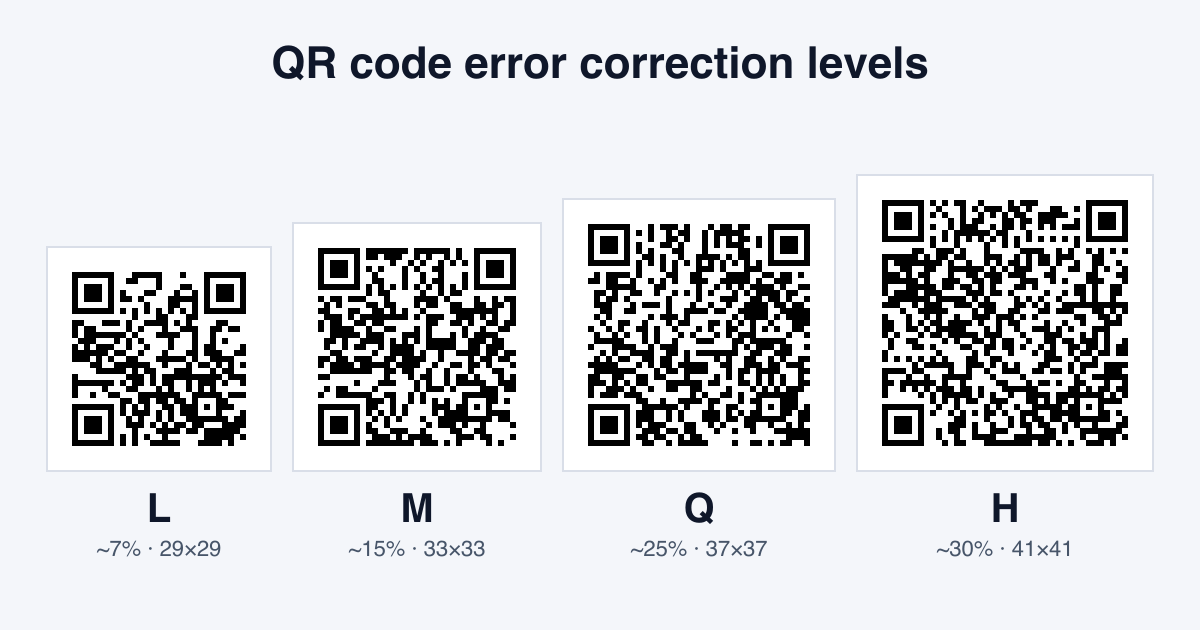
Every QR code carries spare data so it still scans when part of it is scuffed or covered. Here is what the four error correction levels mean, how they change the code, and which one to use.

How small can a printed QR code be? Use our size table for business cards, flyers, posters and more, learn the 10:1 distance rule, and see why more data or a higher error correction level needs extra room.
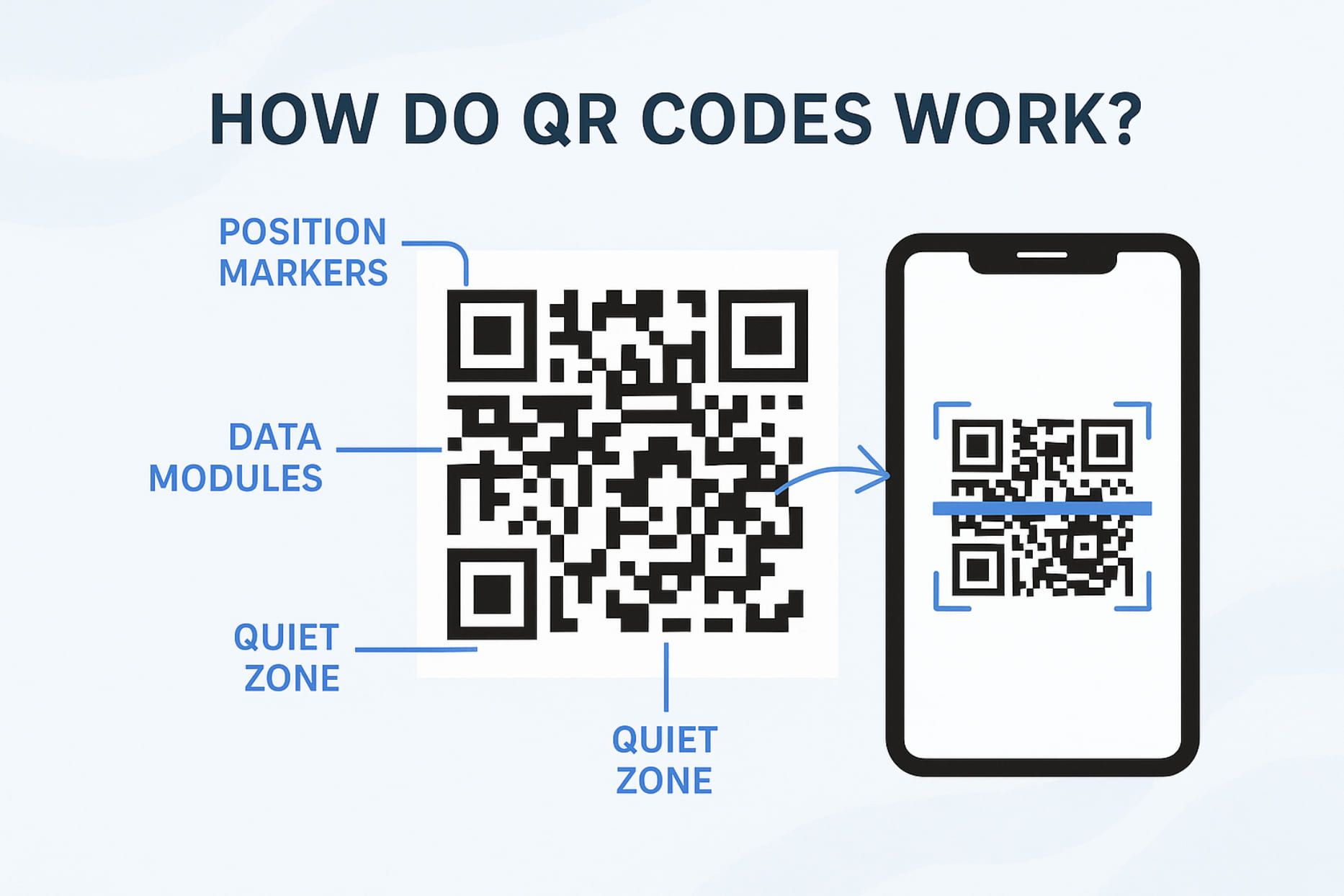
Understand how QR codes work, how data is stored inside them, how QR code scanners read them, and how error correction allows QR codes to work even when partially damaged or dirty.
Turn your link, contact details, Wi-Fi or menu into a QR code, add your logo and colours, and download it.