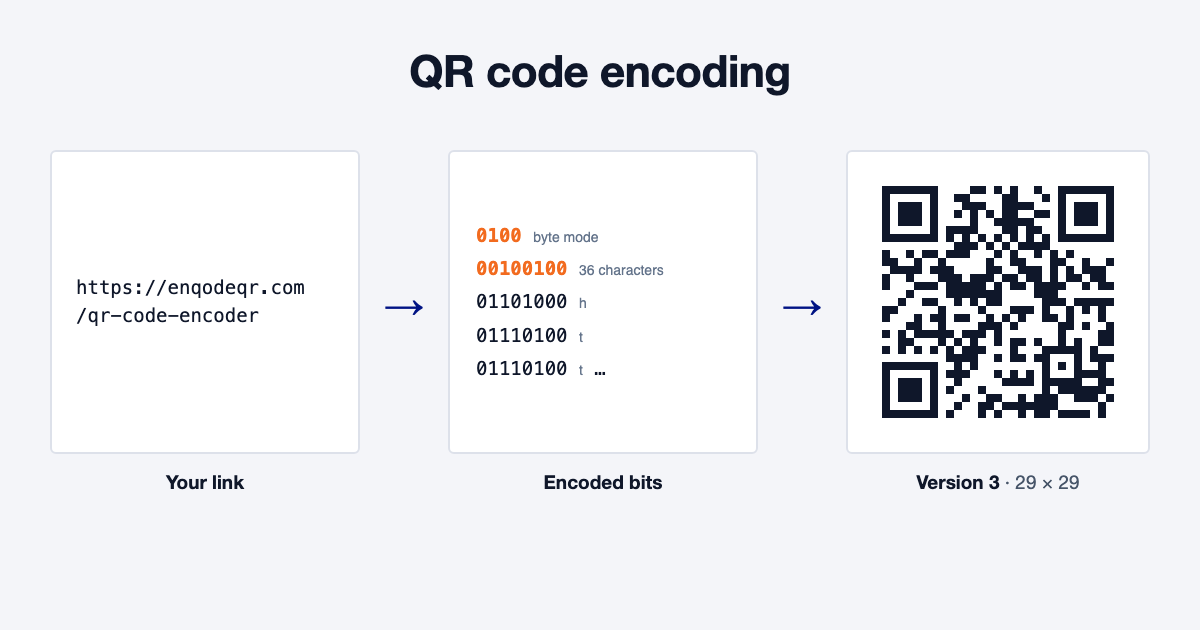
QR code encoding turns data into a QR code in five steps. The encoder picks a mode (numeric, alphanumeric, byte or kanji), picks the smallest version that fits, adds error correction, applies a mask and draws the pattern. More data or a higher error correction level means a bigger version with more squares.
Quick Summary
QR code encoding is how your link or text becomes a QR code. The encoder picks an encoding mode, picks the smallest of 40 versions that fits your data, adds error correction, applies a mask and draws the squares.
You never have to do any of this by hand. Paste your link into a QR code encoder online and it makes every choice for you. Knowing how it works helps you keep your codes small, sharp and quick to scan.
Table of Contents
- What is QR code encoding?
- How a QR code encodes your data, step by step
- The 4 QR code encoding modes
- QR code versions: from 21 × 21 to 177 × 177
- How much data can a QR code hold?
- One link, encoded 8 ways
- How error correction changes the encoding
- How to encode a URL in a QR code
- Tips for a small, scannable code
- FAQ
What Is QR Code Encoding?
QR code encoding is the process that turns data, such as a link, into the pattern of black and white squares in a QR code. Each square, called a module, stands for a 1 or a 0.
A phone camera reads those squares and turns them back into your link. The rules for both sides are set by one international standard, ISO/IEC 18004, so a code made by any encoder scans on any phone. For the bigger picture of how scanning works, see how QR codes work.
How a QR Code Encodes Your Data, Step by Step
Every QR code encoder follows the same five steps, in the same order.
1. Pick the Mode
The encoder looks at your characters and picks the most compact way to store them. A run of digits takes far fewer bits than the same number of letters. The next section covers the four modes.
2. Pick the Version
The encoder counts the bits your data needs and picks the smallest of the 40 QR code sizes, called versions, that can hold them. A short link fits a small version, and a long one needs a bigger version with more modules.
3. Add Error Correction
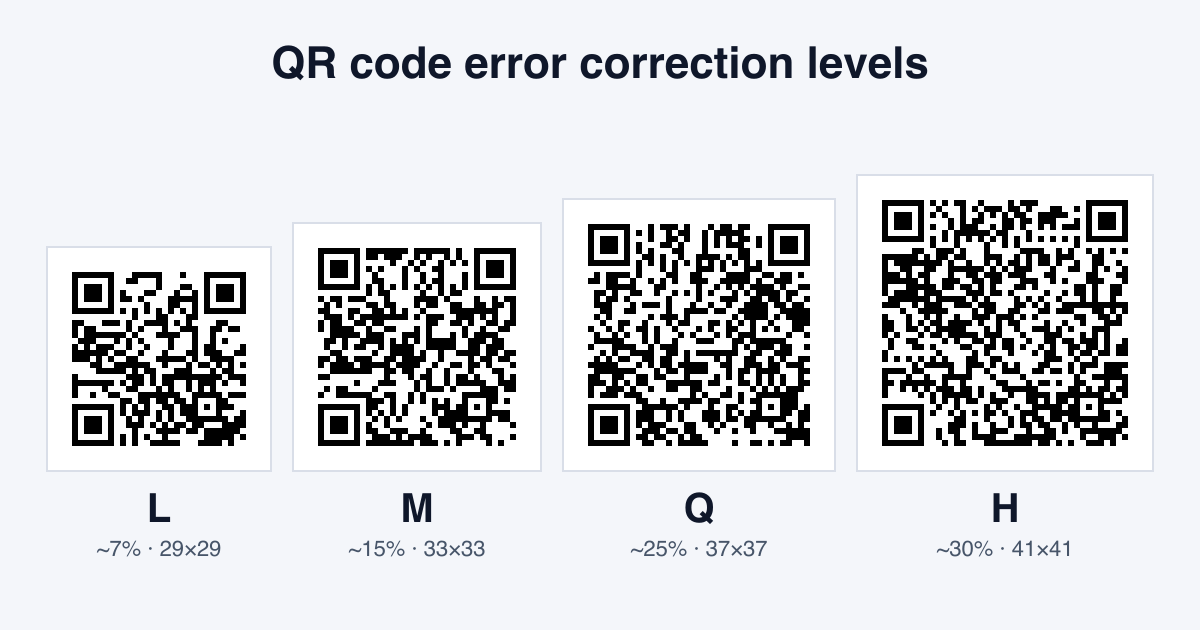
The encoder adds extra backup data, worked out with Reed-Solomon codes, so a phone can still read the code when part of it is dirty, scratched or covered by a logo. There are four levels, L, M, Q and H, and a higher level adds more backup.
4. Apply a Mask
Data can leave large blocks of one colour or shapes that look like the corner squares, which confuse a camera. The encoder tries all 8 standard mask patterns, which flip modules in a set pattern, and keeps the one that gives the most even mix of black and white.
5. Draw the Pattern
Last, the encoder places the fixed parts every QR code has: the three big squares in the corners that tell the camera where the code is, the timing lines between them, the smaller alignment squares in version 2 and up, and a strip that records the error correction level and mask. Your data fills the rest. A quiet margin of 4 modules goes around the outside.
The 4 QR Code Encoding Modes
A QR code stores characters in one of four modes. The smaller a mode's character set, the fewer bits each character takes, so the same code holds more.
Numeric
Digits 0 to 9 only. Three digits share 10 bits, about 3.3 bits a digit, which makes numeric the most compact mode. It suits phone numbers, product numbers and other codes made only of digits.
Alphanumeric
The digits, the capital letters A to Z, the space and nine symbols: $ % * + - . / and :. That's 45 characters, and two of them share 11 bits. Lowercase letters aren't in the set, so most links can't use this mode.
Byte
Any character at all, stored as bytes of 8 bits each. Links, lowercase text, accents and emoji all use byte mode. Most encoders today write byte mode as UTF-8, which modern phones read correctly. A typical link is encoded in byte mode.
Kanji
Japanese kanji and kana characters in the Shift JIS set, 13 bits each. It packs Japanese text tighter than byte mode does.
Some encoders split mixed data into segments, such as a run of digits in numeric mode followed by text in byte mode. For a short link, one mode is usual.
QR Code Versions: From 21 × 21 to 177 × 177
A QR code comes in 40 versions. Version 1 is 21 × 21 modules, and each version adds 4 modules to each side, up to 177 × 177 for version 40, as DENSO WAVE, the company that invented the QR code, explains.
The version is about the number of modules, not the printed size. A version 3 code can be printed on a stamp or a billboard. What changes is how small each module gets at a given print size: a higher version has smaller modules, so it needs to be printed bigger to scan from the same distance.
How Much Data Can a QR Code Hold?
How much a QR code holds depends on three things: the version, the mode and the error correction level. Here are the most characters each version can hold at the lowest level (L) and the highest (H).
| Version | Size | Digits (L / H) | Capitals and digits (L / H) | Bytes, such as a link (L / H) |
|---|---|---|---|---|
| 1 | 21 × 21 | 41 / 17 | 25 / 10 | 17 / 7 |
| 10 | 57 × 57 | 652 / 288 | 395 / 174 | 271 / 119 |
| 25 | 117 × 117 | 3,057 / 1,286 | 1,853 / 779 | 1,273 / 535 |
| 40 | 177 × 177 | 7,089 / 3,057 | 4,296 / 1,852 | 2,953 / 1,273 |
The maximum, 7,089 digits, needs the largest version at the lowest error correction level. In real life you'd never print a code that dense. A 50-character link fits version 3 at level L and version 6 at level H.
One Link, Encoded 8 Ways
To see mode and error correction at work, we encoded the 36-character link https://enqodeqr.com/qr-code-encoder at all four levels. Then we encoded the same link in capitals, which lets it use alphanumeric mode.
| Error correction | As typed (byte mode) | In capitals (alphanumeric mode) |
|---|---|---|
| L (about 7%) | Version 3, 29 × 29 | Version 2, 25 × 25 |
| M (about 15%) | Version 3, 29 × 29 | Version 2, 25 × 25 |
| Q (about 25%) | Version 4, 33 × 33 | Version 3, 29 × 29 |
| H (about 30%) | Version 5, 37 × 37 | Version 4, 33 × 33 |
Two things stand out. Raising the level from L to H makes the same link two versions bigger. And switching from byte to alphanumeric mode saves one version at every level, because each character takes fewer bits.
Capitals have a catch. The https:// part and the domain don't care about case, but the path after the domain often does, so a link in capitals can open a "page not found" error. Only use capitals for a link you've tested that way.
How Error Correction Changes the Encoding
Error correction is the backup data from step 3. It takes up space, so a higher level leaves less room for your data and pushes the code to a bigger version, as the table above shows.
Enqode QR sets the level for you. A plain code uses level Q. When you add a logo, choose the Dots pattern, use a gradient or pick a custom eye, the code moves up to level H, so it keeps scanning with part of the pattern covered. Our guide to QR code error correction levels shows the same link at each level side by side.
How to Encode a URL in a QR Code
Encoding a URL takes three steps in a QR code encoder online:
- 1
Copy your full link. Include https:// so the phone knows it's a web address.
- 2
Paste it into the encoder & customize (optional). Add your logo and colours.
- 3
Download and test. Scan the code with an iPhone and an Android phone before you share or print it.
The shorter the link, the smaller the version. A 150-character link full of tracking tags needs version 12 at level H, against version 6 for a 50-character link. A dynamic QR code solves this a different way: it encodes a short Enqode QR scan link, so the pattern stays the same size however long the page address you point it to, and you can change that address after printing.
Tips for a Small, Scannable Code
A lower version means bigger modules at the same print size, and bigger modules scan faster.
- Keep the link short. Remove tracking tags you don't need, or use a dynamic code.
- Don't fight the encoder. It already picks the best mode and the smallest version, so there are no settings to tune.
- Leave the quiet margin. Keep a clear border around the code, free of text and graphics.
- Print it big enough. A denser code needs more room. Our minimum QR code size for printing guide has sizes for every spot.
- Use dark on light. A dark code on a white or pale background gives the camera the most contrast.
FAQ
Conclusion
QR code encoding picks a mode for your characters, the smallest version that fits, enough error correction to survive wear and a logo, and a mask that keeps the pattern easy to read. Short data makes a small code with big modules, and that's the code that scans fastest. Keep your link short, leave a clear margin and test it before you print.